
- Overview
- Asking follow-up questions
- Starting a new conversation
- Opening a past conversation
- Tips for great conversations
Overview
ICC AI Navigator now features a default conversation mode. This means that, within each conversation, AI Navigator will consider the context of your inputs. Each new question thus builds on the previous ones, allowing you to ask follow-up questions, request clarification, or explore your code topic in more detail. Ai Navigator will also provide its own questions back when it feels able to predict what the next useful question might be.
Asking follow-up questions
When you start a conversation with ICC AI Navigator, it uses your first question to research the topic and provide an answer and useful linked sections within the ICC code:
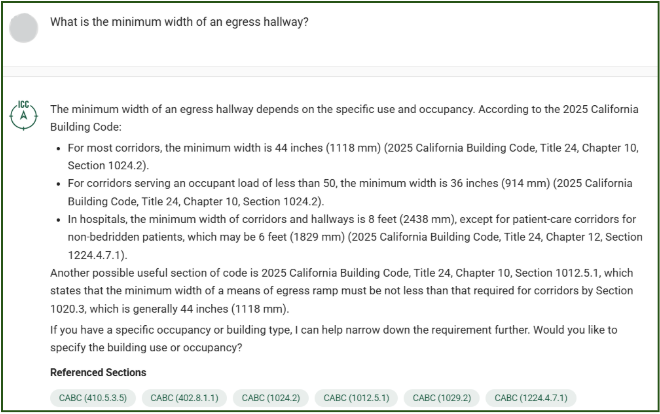
To ask a second question on this topic, you can enter your next question in the same box as your first one, and simply hit “enter” or click the green arrow to the right:

When you do this, AI Navigator is going to consider your new question and the previous question and answer.
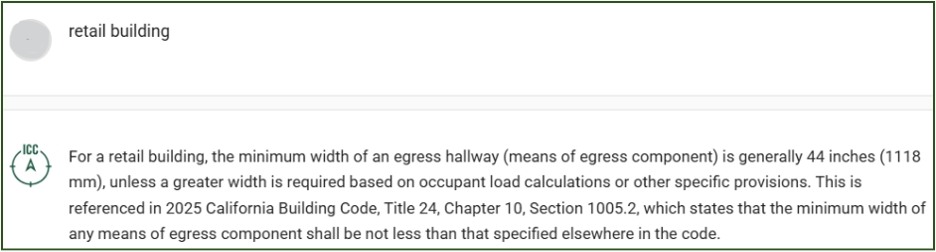
You can continue to ask as many questions as you like within your conversation. Note that AI Navigator will often offer suggested follow-up information that might help its answers, such as:

In this case, even a very brief reply from you will prompt AI Navigator to narrow the criteria of the question:
Starting a new conversation
While AI Navigator will continue to answer questions in a conversation even if the topic changes, we recommend that you use the “new chat” option if you wish to ask about a new topic and remove any context of the past topic of conversation. It is easy to do this by selection the “New Chat” option directly above the arrow you have been using:

Opening a past conversation
ICC AI Navigator retains all your past individual questions and conversations, and displays them under the heading “Your History”:
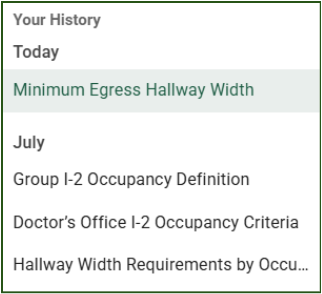
Each past conversation has a brief title that AI Navigator has created. When you select a title, that conversation will open. If you now ask a question, your new question will go into that conversation. AI Navigator will use the previous questions and answers and consider them in its next answer.
Tips for great conversations
ICC AI Navigator has answered hundreds of thousands of questions to date, and we’ve reviewed many of them to create some tips for having great conversations with it:
- Be specific This starts with making sure you select the correct I-Code cycle or US state code you want AI Navigator to consider. It also means being clear about what you want. For instance, if you are asking about egress, you might want required dimensions, information about a certain building use or occupancy, or specific information on egress windows. Including those specific requests in your first question will help build your conversation.
- Be clear if the first response is not what you need
If the details AI Navigator provide are off target, say so. An effective reply will tell the chatbot that you are not getting what you want:
- Tell AI Navigator who you are
AI Navigator does consider the role of the questioner when providing information, so if your question may have multiple factors depending on who you are, it can be helpful to provide this information up front:

- Request a specific format of answer if you need it
If you want a brief answer, say so. If you want as much information in the answer as possible, say that. And if you want a list, request it!



